Transformations
parameter_transforms lets you modify model parameters during a simulation. Use them to apply seasonality, scale a parameter during a window, or replace it outright. Three methods are supported:
| Method | What it does | Applied when |
|---|---|---|
balcan | Sinusoidal seasonality across the whole simulation timeline (multiplicative) | pre-simulation |
scale | Constant multiplicative factor over a date window | pre-simulation |
override | Absolute replacement value over a date window (scalar or per age group) | during simulation |
All three transforms target an existing parameter via target_parameter, which must already be defined in model.parameters. Both source parameters (scalar or age-varying) and calculated parameters are valid targets. Transforms on a source propagate through any expression that references it; transforms on a calc-param itself apply after the expression is evaluated, so the two compose naturally (see Transforms on calculated parameters).
Composition order
Multiple transforms on the same parameter compose:
balcanandscalestack multiplicatively in the order you list them.[balcan, scale(0.5)]first applies the seasonal envelope, then halves it.overridealways wins for its date window, regardless of where it appears in the list (epydemix stores overrides separately frommodel.parameters).
Seasonality
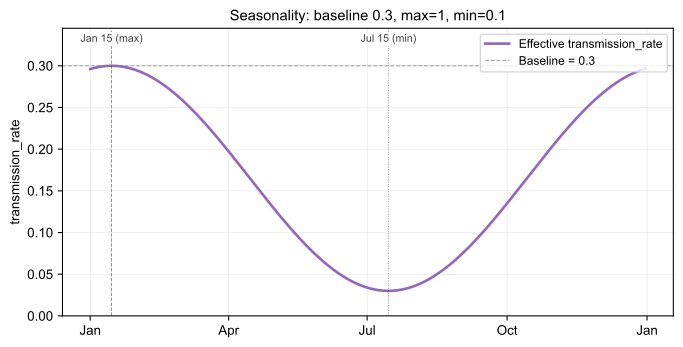
Sinusoidal seasonality based on Balcan D et al., J. Comput. Sci. 2010 (DOI: 10.1016/j.jocs.2010.07.002, eq. 25). The transform is multiplicative on top of the baseline parameter: at each step, the existing value is multiplied by a sinusoidal factor that reaches 1.0 on max_date (the seasonal peak) and min_value / max_value on min_date (the seasonal trough). The effective parameter therefore swings between baseline (peak) and baseline × (min_value / max_value) (trough).
Recommended usage: leave max_value at its default of 1.0 and only set min_value to express the seasonal floor as a fraction of the baseline. For example, min_value=0.1 means "the parameter drops to 10% of baseline at the trough."
The seasonal factor at time (days since the simulation start) is
where:
- , :
min_valueandmax_value - : day index of
max_date - : period in days;
2 × |min_date − max_date|ifmin_dateis set, otherwise 365
The effective parameter is then baseline × s(t), ranging in [baseline × min_value/max_value, baseline].
For example, with transmission_rate = 0.3, min_value = 0.1, max_date = 2024-01-15, and min_date = 2024-07-15 (and the default max_value = 1), the effective rate is 0.3 × 1 = 0.3 on Jan 15 and 0.3 × 0.1 = 0.03 on Jul 15, sweeping smoothly between the two over the year.
| Field | Required | Description |
|---|---|---|
target_parameter | yes | Parameter name to modulate (e.g. transmission_rate). |
max_date | yes | Date when the multiplier reaches its peak (1.0), YYYY-MM-DD. |
min_value | yes | Lower bound of the seasonal scaling. With the default max_value=1, this is the fraction of baseline at the trough (e.g. 0.1 = 10% of baseline). |
max_value | no | Upper bound of the seasonal scaling. Defaults to 1.0. Only set this if you want to express both bounds in absolute units; only the ratio min_value / max_value affects the dynamics. |
min_date | no | Date of the trough. If set, period = `2 × |
curl -X POST https://epyscenario-api.isi.it/api/v1/simulations \
-H "Content-Type: application/json" \
-d '{
  "model": {
    "preset": "SIR",
    "parameters": { "transmission_rate": 0.3, "recovery_rate": 0.1 }
  },
  "population": { "name": "United_States" },
  "simulation": {
    "start_date": "2024-01-01",
    "end_date": "2024-12-31",
    "Nsim": 50,
    "seed": 42
  },
  "parameter_transforms": [
    {
      "target_parameter": "transmission_rate",
      "method": "balcan",
      "max_date": "2024-01-15",
      "min_date": "2024-07-15",
      "min_value": 0.1
    }
  ]
}'
Scale
Multiply a parameter by a constant factor inside [start_date, end_date]; outside the window the multiplier is 1.0.
For example, if transmission_rate = 0.1 and factor = 0.5, the effective rate is 0.1 × 0.5 = 0.05 inside the window, and 0.1 everywhere else.
![Scale example: baseline 0.1 with factor 0.5 inside [Mar 1, Apr 1]](/assets/images/scale-9b7c18efea4c1c348ae9161f4de1caef.svg)
| Field | Required | Description |
|---|---|---|
target_parameter | yes | Parameter name to scale. |
start_date | yes | Window start, YYYY-MM-DD. |
end_date | yes | Window end, YYYY-MM-DD. Must be ≥ start_date. |
factor | yes | Multiplicative factor applied within the window. |
curl -X POST https://epyscenario-api.isi.it/api/v1/simulations \
-H "Content-Type: application/json" \
-d '{
  "model": { "preset": "SIR" },
  "population": { "name": "United_States" },
  "simulation": {
    "start_date": "2024-01-01",
    "end_date": "2024-06-01",
    "Nsim": 10
  },
  "parameter_transforms": [
    {
      "target_parameter": "transmission_rate",
      "method": "scale",
      "start_date": "2024-03-01",
      "end_date": "2024-04-01",
      "factor": 0.5
    }
  ]
}'
Override
Replace a parameter outright during a date window. The replacement can be a scalar or a per-age-group list (length must match the resolved population's age groups).
For example, if transmission_rate = 0.3 and an override sets value = 0.1 for [2024-03-01, 2024-04-01], the rate is 0.1 everywhere inside that window and 0.3 outside, irrespective of any balcan or scale transforms also targeting the same parameter.
![Override example: baseline 0.3 with value 0.1 inside [Mar 1, Apr 1]](/assets/images/override-f50d2d21666ca67f6417d1d656b16058.svg)
| Field | Required | Description |
|---|---|---|
target_parameter | yes | Parameter name to override. |
start_date | yes | Window start, YYYY-MM-DD. |
end_date | yes | Window end, YYYY-MM-DD. Must be ≥ start_date. |
value | yes | Scalar (float) or per-age-group list (list[float]). |
Scalar override
curl -X POST https://epyscenario-api.isi.it/api/v1/simulations \
-H "Content-Type: application/json" \
-d '{
  "model": { "preset": "SIR" },
  "population": { "name": "United_States" },
  "simulation": {
    "start_date": "2024-01-01",
    "end_date": "2024-06-01",
    "Nsim": 10
  },
  "parameter_transforms": [
    {
      "target_parameter": "transmission_rate",
      "method": "override",
      "start_date": "2024-03-01",
      "end_date": "2024-04-01",
      "value": 0.1
    }
  ]
}'
Per-age-group override
The list length must equal the number of age groups in your resolved population.
curl -X POST https://epyscenario-api.isi.it/api/v1/simulations \
-H "Content-Type: application/json" \
-d '{
  "model": { "preset": "SIR" },
  "population": {
    "name": "United_States",
    "contacts_source": "prem_2021",
    "age_group_mapping": {
      "0-4":   ["0-4"],
      "5-17":  ["5-9", "10-14", "15-19"],
      "18-49": ["20-24", "25-29", "30-34", "35-39", "40-44", "45-49"],
      "50-64": ["50-54", "55-59", "60-64"],
      "65+":   ["65-69", "70-74", "75+"]
    }
  },
  "simulation": {
    "start_date": "2024-01-01",
    "end_date": "2024-06-01",
    "Nsim": 10
  },
  "parameter_transforms": [
    {
      "target_parameter": "transmission_rate",
      "method": "override",
      "start_date": "2024-03-01",
      "end_date": "2024-04-01",
      "value": [0.10, 0.12, 0.10, 0.08, 0.06]
    }
  ]
}'
Inspecting the effective parameter values
To verify what actually drove the simulation (handy for plotting seasonality curves or sanity-checking overrides), set output.include_parameters: true. The response gains a results.parameters section with the per-step value of every model parameter, broadcast to per-age-group arrays. Override windows are baked in.
The parameters section is shared across stochastic runs: parameters are deterministic inputs, so there's a single array per parameter regardless of Nsim. Off by default to keep responses small.
curl -X POST https://epyscenario-api.isi.it/api/v1/simulations \
-H "Content-Type: application/json" \
-d '{
  "model": {
    "preset": "SIR",
    "parameters": { "transmission_rate": 0.3, "recovery_rate": 0.1 }
  },
  "population": { "name": "United_States" },
  "simulation": {
    "start_date": "2024-01-01",
    "end_date": "2024-12-31",
    "Nsim": 10
  },
  "parameter_transforms": [
    {
      "target_parameter": "transmission_rate",
      "method": "balcan",
      "max_date": "2024-01-15",
      "min_date": "2024-07-15",
      "max_value": 1,
      "min_value": 0.1
    }
  ],
  "output": { "include_parameters": true }
}'
The relevant slice of the response:
{
  "results": {
    "parameters": {
      "dates": ["2024-01-01", "2024-01-02", "..."],
      "data": {
        "transmission_rate": {
          "0-4":   [0.296, 0.297, "..."],
          "5-19":  [0.296, 0.297, "..."],
          "...":   []
        },
        "recovery_rate": {
          "0-4":  [0.10, 0.10, "..."]
        }
      }
    }
  }
}
Use the API Reference to explore each transform schema field-by-field and try requests interactively.